

NETWORK笔记4:华为命令
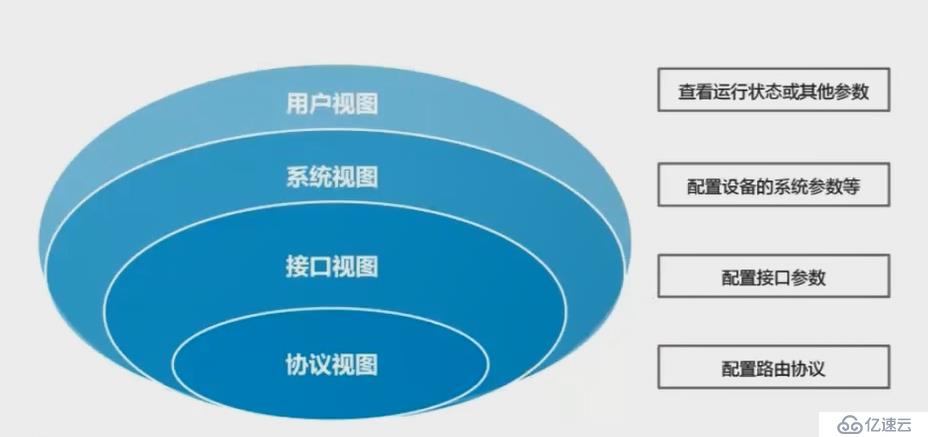
Enter system view, return user view with Ctrl+Z. #进入系统视图,返回用户视图用Ctrl+Z。
[Huawei]interface Ethernet 0/0/1 #接口视图 Ethernet:接口类型 0/0/1:第一个0代表槽位,第二个0代表子卡号,1代表接口号
[Huawei-Ethernet0/0/1]quit #返回上一试图
[Huawei]ospf #ospt协议视图
[Huawei-ospf-1]
[Huawei-ospf-1]return #回到用户视图
[Huawei]sysname Switch #系统名 交换机
[Switch]display version #显示 版本信息
[Switch]display current-configuration #显示 当前配置
[Switch]user-interface console 0 #用户 接口 控制台 0
[Switch-ui-console0]authentication-mode password #认证模式 密码
[Switch-ui-console0]set authentication password {simple|cipher} 123 #设置 认证 密码 简单|暗文 123 简单|暗文二选一!
[Switch]user-interface console 0
[Switch-ui-console0]authentication-mode aaa
[Switch-ui-console0]aaa
[Switch-aaa]local-user huawei password cipher huawei123 #本地用户 huawei 密码 暗文 huawei123
Info: Add a new user. #信息:添加 新 用户
The current configuration will be written to the device. #当前配置将被写入设备
Are you sure to continue?[Y/N] #您确定继续吗?[y/n]
Save the configuration successfully. #保存配置成功。
System will reboot! Continue?[Y/N]:y #系统将重启!继续[Y/ N]:Y?
Warning: The action will delete the saved configuration in the device. #警告:该操作将删除设备中保存的配置。
The configuration will be erased to reconfigure. Continue? [Y/N]:y #配置将被擦除以重新配置。 继续?[Y/ N]:Y
Info: Succeeded in clearing the configuration in the device. #信息:成功清除设备中的配置。
[Huawei]user-interface console 0
[Huawei-ui-console0]idle-timeout 120 #闲置-时间 120分钟 120分钟后自动退出
[Huawei-ui-console0]screen-length 24 #屏幕-长度24 显示24行
[Huawei]lldp enable #LLDP协议 启用
[Huawei]display lldp neighbor brief #显示LLDP邻居简介
[Huawei]interface GigabitEthernet 0/0/1
[Huawei-GigabitEthernet0/0/1]undo negotiation auto #撤消协商自动
[Huawei-GigabitEthernet0/0/1]duplex {half|full} #双工 半|全
[Huawei-GigabitEthernet0/0/1]speed {10|100|1000} #速度 10|100|1000 M
[Huawei]interface vlan 1
[Huawei-Vlanif1]ip address 192.168.1.250 255.255.255.0 #IP地址192.168.1.250 255.255.255.0
[Huawei-Vlanif1]undo shutdown #解开 关掉 启用
[Huawei]sysname R1
[R1]interface GigabitEthernet 0/0/0
[R1-GigabitEthernet0/0/0]ip address 192.168.2.1 255.255.255.0
[R1]ip route-static 192.168.4.0 255.255.255.0 192.168.2.2 #IP 路由-静态 ip route-static 目标网络ID 子网掩码 下一跳
[R1]ip route-static 0.0.0.0 0.0.0.0 192.168.2.2 #默认路由或缺省路由!
[Router]user-interface vty 0 4 #远程用户登录接口
[HuaweiSwitch]vlan 12 #创建Vlan12
[HuaweiSwitch-vlan12]description HAHA #描述 HAHA (思科name)
[HuaweiSwitch]interface GigabitEthernet 0/0/1
[HuaweiSwitch-GigabitEthernet0/0/1]port link-type access #端口 链接-类型 access
[HuaweiSwitch-GigabitEthernet0/0/1]port default vlan 12 #端口 默认 vlan12
[HuaweiSwitch3]interface GigabitEthernet 0/0/24
[HuaweiSwitch3-GigabitEthernet0/0/24]port link-type trunk #端口 链接-类型 trunk
[HuaweiSwitch3-GigabitEthernet0/0/24]port trunk allow-pass vlan all #端口 trunk 允许通过 VLAN 全部
[HuaweiSwitch]port-group 1 #端口-组 1
[HuaweiSwitch-port-group-1]group-member GigabitEthernet 0/0/1 GigabitEthernet 0/0/3 GigabitEthernet 0/0/5 #组-成员 1 3 5
[HuaweiSwitch-port-group-1]group-member GigabitEthernet 0/0/1 to GigabitEthernet 0/0/9 #组-成员 123456789
[HuaweiSwitch]port-group group-member GigabitEthernet 0/0/1 GigabitEthernet 0/0/3 GigabitEthernet 0/0/5
[HuaweiSwitch]port-group group-member GigabitEthernet 0/0/1 to GigabitEthernet 0/0/9
永久组临时组
华为交换机删除Vlan后端口自动回到Vlan1
[HuaweiSwitch]vlan 1 #创建Vlan1
[HuaweiSwitch]vlan batch 1 3 5 #创建Vlan1 3 5
[HuaweiSwitch]vlan batch 1 to 9 #创建Vlan123456789
[HuaweiSwitch]undo vlan 1 #解开Vlan1
[HuaweiSwitch]undo vlan batch 1 3 5 #解开Vlan1 3 5
[HuaweiSwitch]undo vlan batch 1 to 9 #解开Vlan123456789
未完