

LayaAir之骨骼动画(基础)
LayaAir可以是用DragonBone和Spine生成的骨骼动画文件,但是需要将他们的动画文件进行转化,转化后的文件才能够被LayaAir识别.而无论是DragonBone还是Spine都不是LayaAir官方工具,转化的安全和兼容性有些问题,这是一个坑.
到目前为止此转化有2个问题:
①对版本的支持 , 存在迟滞性
②只支持图集模式
无论怎么样 , 总算是部分支持 . 现在先以DragonBone为例讲解骨骼动画.
Ⅰ, DragonBone骨骼动画 , 以Rooster_Ani为例: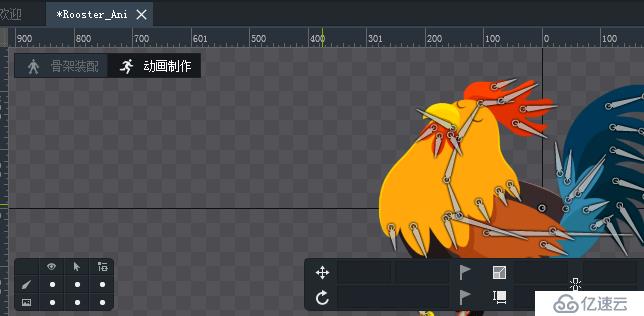
一 : 开始导出DragonBone骨骼动画文件:
①,导出DB文件 , 由于我的LayaAir , DB转换工具支持DB版本范围是 4.5~5.1.0 , 所以: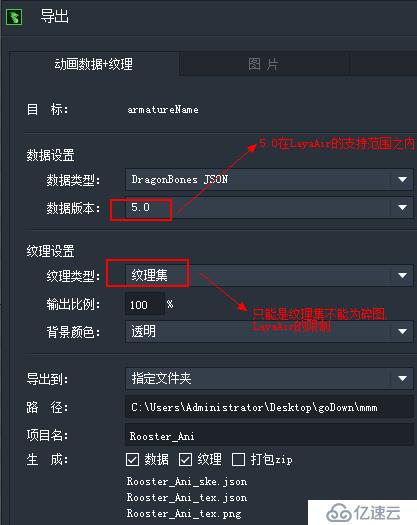
②,DB导出的骨骼文件有三个 : ske 骨骼文件 , tex.json 纹理文件 , tex.png 纹理图片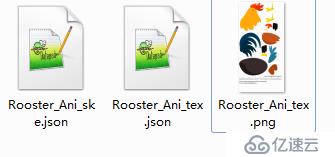
二:使用LayaAir转换DragonBone骨骼动画格式
①,打开龙骨导出工具 , 进行导出(注意,源文件:DragonBone文件夹上;LayaAir转换的文件夹下)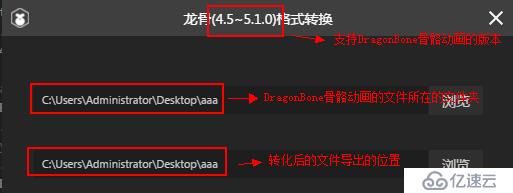
②,将导出的文件(2个),导入到项目中,注意放在bin中: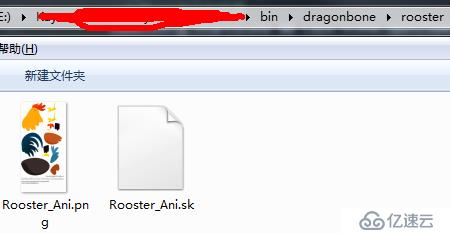
三:代码
①,基本核心
private rooster_dragonbone : Laya.Skeleton = null;
        //显示DragonBone骨骼动画
        this.initDragonAni( true , "rooster_eat_anim");
     /**
     * 初始化DragonBone骨骼动画
     * @param {boolean} $autoPlay 是否自动播放
     * @param {string} $name 动画的名称
     */
    private initDragonAni( $autoPlay : boolean ,  $name : string ) : void{
        this.rooster_dragonbone = new Laya.Skeleton();
        Laya.stage.addChild( this.rooster_dragonbone );
        this.rooster_dragonbone.pos( 410 , 600 );
        this.rooster_dragonbone.load("dragonbone/rooster/Rooster_Ani.sk" , Laya.Handler.create( this, () : void => {
            this.mouse2DragonBone( true );
            if(!$autoPlay || !$name){
                this.rooster_dragonbone.stop();
            }else{
                this.showDragonAni( $name );
            }
        } ));
    }

    private mouse2DragonBone( $isAdd : boolean ) : void {
        if( this.rooster_dragonbone ){
            console.log("ccccccc");
            if($isAdd){
                let $event : Laya.Event = new Laya.Event();
                $event.type = Laya.Event.COMPLETE;
                this.rooster_dragonbone.player.on( Laya.Event.COMPLETE , this , this.onDragonBoneHandler , [$event]);
            }else{
                this.rooster_dragonbone.player.off( Laya.Event.COMPLETE , this , this.onDragonBoneHandler  );
            }
        }
    }

        private onDragonBoneHandler( $e : Laya.Event ) : void{
        console.log("ok");
        switch($e.type){
            case Laya.Event.COMPLETE:
            console.log(`DragonBone 动画播放完毕!!!`);
            break;
        }
    }

    private showDragonAni( $name : string ) : void{
        if( this.rooster_dragonbone && $name){
            this.rooster_dragonbone.play( $name , true );
        }
    }
注意:
1,骨骼动画一定要循环播放才会触发Complete事件.有点坑......
2,如果不调用this.rooster_dragonbone.stop();则播放默认动作: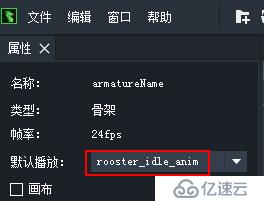
结果: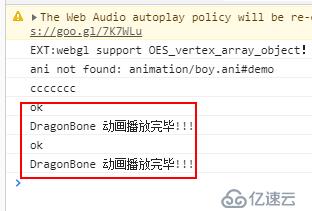
②,扩展鼠标事件
在LayaAir中为2D骨骼动画加mouse响应是复杂的.下边慢慢介绍:
a,寻找响应区域:
        this.rooster_dragonbone.load("dragonbone/rooster/Rooster_Ani.sk" , Laya.Handler.create( this, () : void => {
            let bound : Laya.Rectangle = this.rooster_dragonbone.getBounds(); // 加载完毕之后才能拿到有效的bounds
            let W = bound.width, H = bound.height;
            this.rooster_dragonbone.width = W;   // 若不设置的话, this.rooster_dragonbone.width与node.height均为0
            this.rooster_dragonbone.height = H;
            this.rooster_dragonbone.graphics.drawRect(0, 0, bound.width, bound.height, "#ff00ee");
            this.mouse2DragonBone( true );
            if(!$autoPlay || !$name){
                this.rooster_dragonbone.stop();
            }else{
                this.showDragonAni( $name );
            }
        } ));
注意:让动画停止,方可获取Laya.Rectangle,运行结果如下: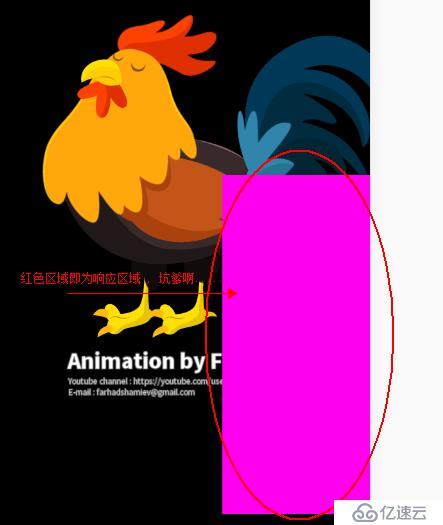
这个和DragonBone的关系对应(右下区域块):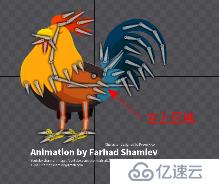
b,解决方案
因为不可能调整骨骼动画的Laya.Rectangle , 所以需要为骨骼动画套一层(父层),用父层来承担响应.
private rooster_father_dragonbone : Laya.Sprite = null;
//显示DragonBone骨骼动画
this.initDragonAni( true , "rooster_eat_anim");
    /**
     * 初始化DragonBone骨骼动画
     * @param {boolean} $autoPlay 是否自动播放
     * @param {string} $name 动画的名称
     */
    private initDragonAni( $autoPlay : boolean ,  $name : string ) : void{
        this.rooster_father_dragonbone = new Laya.Sprite();
        this.rooster_father_dragonbone.mouseEnabled = this.rooster_father_dragonbone.mouseThrough = true;
        this.rooster_dragonbone = new Laya.Skeleton();
        this.rooster_father_dragonbone.addChild( this.rooster_dragonbone );
        Laya.stage.addChild( this.rooster_father_dragonbone );
        this.rooster_father_dragonbone.pos( 100 , 600 );
        this.rooster_dragonbone.load("dragonbone/rooster/Rooster_Ani.sk" , Laya.Handler.create( this, () : void => {
            let bound : Laya.Rectangle = this.rooster_dragonbone.getBounds(); // 加载完毕之后才能拿到有效的bounds
            let W = bound.width, H = bound.height;
            this.rooster_dragonbone.width = W;   // 若不设置的话, this.rooster_dragonbone.width与node.height均为0
            this.rooster_dragonbone.height = H;
            this.rooster_dragonbone.pos(W/2, H/2); // 骨骼节点偏移(W/2,H/2),使动画区域的左上角与proxy节点的位置(左上角)重合
            this.rooster_father_dragonbone.width = W;
            this.rooster_father_dragonbone.height = H;
            this.rooster_father_dragonbone.graphics.drawRect(0, 0, bound.width, bound.height, "#ff00ee");
            this.mouse2DragonBone( true );
            if(!$autoPlay || !$name){
                this.rooster_dragonbone.stop();
            }else{
                this.showDragonAni( $name );
            }
        } ));
    }

    private mouse2DragonBone( $isAdd : boolean ) : void {
        if( this.rooster_dragonbone ){
            console.log("ccccccc");
            if($isAdd){
                let $event : Laya.Event = new Laya.Event();
                $event.type = Laya.Event.COMPLETE;
                this.rooster_dragonbone.player.on( Laya.Event.COMPLETE , this , this.onDragonBoneHandler , [$event]);
                $event = new Laya.Event();
                $event.type = Laya.Event.MOUSE_DOWN;
                this.rooster_father_dragonbone.on( Laya.Event.MOUSE_DOWN , this , this.onDragonBoneHandler , [$event] );
            }else{
                this.rooster_dragonbone.player.off( Laya.Event.COMPLETE , this , this.onDragonBoneHandler  );
                this.rooster_father_dragonbone.off( Laya.Event.MOUSE_DOWN , this , this.onDragonBoneHandler  );
            }
        }
    }

    private onDragonBoneHandler( $e : Laya.Event ) : void{
        console.log("ok");
        switch($e.type){
            case Laya.Event.COMPLETE:
            console.log(`DragonBone 动画播放完毕!!!`);
            break;
            case Laya.Event.MOUSE_DOWN:
            console.log(`DragonBone 动画被单击`);
            break;
        }
    }

    private showDragonAni( $name : string ) : void{
        if( this.rooster_dragonbone && $name){
            this.rooster_dragonbone.play( $name , true );
        }
    }
显示: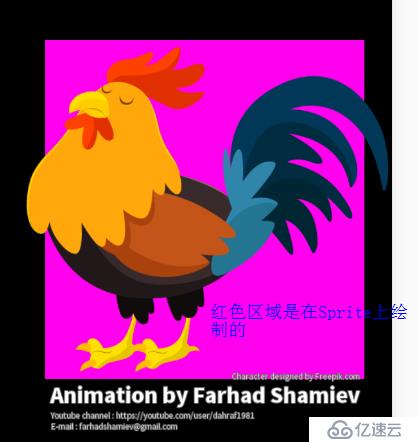
控制台打印: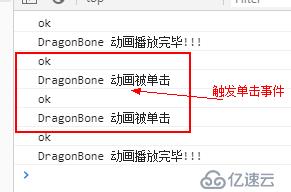
上一篇:UE4 退出(关闭)程序 代码
下一篇:VS开发简繁体中文转换