

Powershell Scripting Game - Jan 2016
每个月Powershell.Org上面都会有一期小挑战,一般都是要求实现一些实践性很强的小脚本。
这一期的链接如下
http://powershell.org/wp/2016/01/02/january-2016-scripting-games-puzzle/
基本要求是:
Server uptime is the lifeblood of system administrators. We strive on it, get addicted to it..we need…more server uptime! Don’t you think something as addictive and important as server uptime be measured? How do we know we’re getting our uptime fix? As that famous quote goes, “Reality does not exist until it’s measured.”. Let’s measure it not only for our own sake but also to give a pretty report to our manager with all those whizbang, doohickey Excel juju that they love to see!
For this month’s challenge, I want you to create a PowerShell function that you can remotely point to a Windows server to see how long it has been up for. Here’s an example of what it should output.

Requirements:
1. Support pipeline input so that you can pipe computer names directly to it.
2. Process multiple computer names at once time and output each computer’s stats with each one being a single object.
3. It should not try to query computers that are offline. If an offline computer is found, it should write a warning to the console yet still output an object but with Status of OFFLINE.
4. If the function is not able to find the uptime it should show ERROR in the Status field.
5. If the function is able to get the uptime, it should show ‘OK’ in the Status field.
6. It should include the time the server started up and the uptime in days (rounded to 1/10 of a day)
7. If no ComputerName is passed, it should default to the local computer.
Bonus:
1. The function should show a MightNeedPatched property of $true ONLY if it has been up for more than 30 days (rounded to 1/10 of a month). If it has been up for less than 30 days, MightNeedPatched should be $false.
豆子自己写了个简单的函数,时间有限,基本实现了题目90%的功能。
function Get-Uptime{
<#
.Synopsis
   Get machine uptime from remtoe machine
.DESCRIPTION
   Get machine from remtoe machine
.EXAMPLE
   Get-Uptime sydav01,sydit01
   This will get the up time of server sydav01 and sydit01
.INPUTS
   String name of server names
.OUTPUTS
   Output from this cmdlet (if any)
.NOTES
   This is a test function
.COMPONENT
   The component this cmdlet belongs to Yuan Li
.ROLE
   The role this cmdlet belongs to Yuan Li
.FUNCTIONALITY
   The functionality that best describes this cmdlet
#>


    Param
    (
        # Param1 help description
        [Parameter(
                   ValueFromPipelineByPropertyName=$true,
                   Position=1)
                   ][string[]]$ComputerNames=$env:COMPUTERNAME


    )

#

$pp=$null
$pp=[ordered]@{'Computername'=$null;'StartTime'=$null;'Uptime(Days)'=$null;'Status'=$null;'MightNeedPatched'=$null}
$obj=New-Object -TypeName psobject -property $pp


$result=@()


foreach ($b in $ComputerNames){


if (Test-Connection $b -Count 1 -Quiet){


$os=Get-CimInstance -ComputerName $b -ClassName win32_operatingsystem


$objtemp=$obj |select *
$objtemp.Computername=$b

$objtemp.starttime=$os.LastBootUpTime

if($os.LastBootUpTime -ne $null){

$objtemp.status="Online"

}
else
{
$objtemp.status="Error"
}


$objtemp.'Uptime(Days)'=($os.LocalDateTime-$os.LastBootUpTime).Days

if ($objtemp.'Uptime(Days)' -gt 30)
{
$objtemp.MightNeedPatched=$True
}
else
{$objtemp.MightNeedPatched=$False}


$result+=$objtemp

}
else{
$warning= "Server "+$b+" is Offline!"
$warning | Write-Warning

$objtemp=$obj |select *
$objtemp.Computername=$b
$objtemp.status="Offline"

$result+=$objtemp


}

}


$result | sort Status | ft
}

$names=get-adcomputer -Filter {operatingsystem -like "*2012*"}
Get-Uptime -ComputerNames $names.name
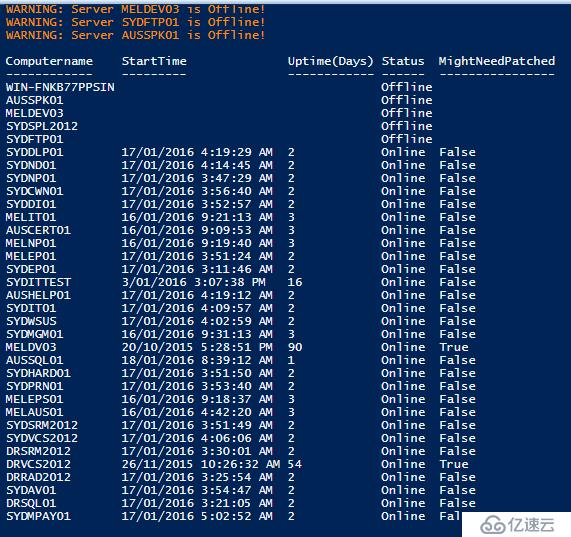
基本思路很简单:创建一个空的自定义的对象,根据PING的结果把不同的值放进这个对象
需要注意的小地方:
Hash表默认是无序的,因此定义的时候需要指定为有序,不然生成的对象顺序也是随机的。
获取wmi的值,powershell里面可以用get-wmiobject 或者 get-ciminstance ,后者支持管道和智能提示,不过只能在Powershell v3以后 版本使用。这里我使用的是后者,因为他的lastbootuptime会自动转换成人更可读的格式。前者还需要手动转换一下。
Test-Connection 判断PING,这里我只发送了一个ICMP包作测试
不足之处:(稍后有空补上)
我没有做任何容错处理,只有一个简单的判断语句而已;应该加入try..catch 和 ErrorAction/Error Value等
我没有考虑时间的四舍五入进位(1/10天)
结果如下:
上一篇:AS3和JS如何实现通信