

LayaAir之List
注意 : 引擎选用的是LayaAir 2.0.0.bate4
一,前言 : 在List中加入ScrollBar是很简单的 . 如下图: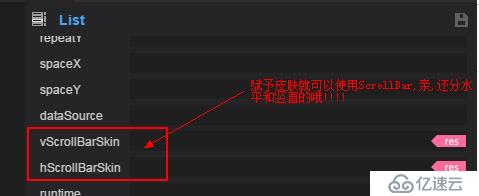
但是 , 这些滑动条不太简洁 , 可能入不了你我的法眼.
①,传统滑动条分4部分组成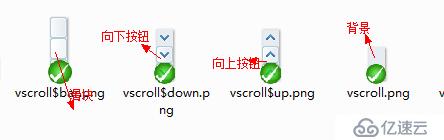
我们放入Ui , 看看效果: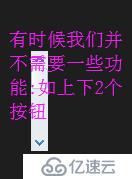
乘上 , 如想实现简洁版的滑动条(其实只是需要一些简单的功能). 可以完全使用Slider来做.如下 :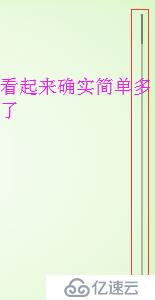
二,关联List和Slider
List的一般基础设置:
        this.con_list.itemRender = BallSkinRender;
        this.con_list.array = null;
        this.con_list.vScrollBarSkin = "";
        this.con_list.scrollBar.elasticBackTime = 500;
        this.con_list.scrollBar.elasticDistance = 200;
        this.con_list.repeatX = 4;
        this.con_list.spaceX = 10;
        this.con_list.spaceY = 10;
        this.con_list.scrollBar.isVertical = true;
        this.con_list.scrollBar.setScroll( 0 , 100, 0 );

        this.con_list.selectHandler = Laya.Handler.create(this , this._list_select , null , false);
        this.con_list.scrollBar.changeHandler = Laya.Handler.create( this , this._scroll_Change , null , false );
注解 :
① : 设置 this.con_list.vScrollBarSkin = ""; 才能设置回弹 , 进度等信息 . 比如 :this.con_list.scrollBar.changeHandler = Laya.Handler.create( this , this._scroll_Change , null , false );
我们可以侦听到进度的信息.
② : this.con_list.scrollBar.setScroll( 0 , 100, 0 ); 参数 : 1 , 最小值 ; 2 , 最大值 ; 3 , 当前值
核心关联:
    /**
     * 选择元素
     * @param {number} $index 从0开始
     * @private
     */
    private _list_select( $index : number ) : void{
        console.log(`AAACCC : ${$index}`);
    }

    private _scroll_Change( $value : number ) : void{
        if( $value <= 0 ){
            this.vs_bar.value = 0;
        }else if( $value >= this.con_list.scrollBar.max ){
            this.vs_bar.value = 100;
        }else{
            this.vs_bar.value = ( ($value * 1.0) / this.con_list.scrollBar.max ) * 100;
        }
    }
注解 : ① : vs_bar 即 Slider
② : _scroll_Change方法实现了关联.(是Slider滑块位置准确反映List拖动的进度).
补充 , 关于LayaAir1.0的list编程的方案及注意点
①,为list绑定一个渲染的方法 ( $cell : CellRender , $index : number ) => void
①-1 , $cell : 渲染的cell单元
①-2 , $index : 渲染cell的序列 , 从0开始
①-3 , 具体绑定代码如下:
this.con_list.renderHandler = new Laya.Handler( this , this.updateItem );②,显示绑定的方法
        public updateItem( $cell :  BallSkinRender , $index : number ) : void{
            $cell.~~DataSource~~ = $cell.dataSource;
        }
注意 : $cell.dataSource的数据是通过list.array里面自动获取的.在BallSkinRender中,实现DataSource的set方法就行.另外 , 不需要list.refresh方法
在LayaAir2.0中 , 需要在Render类中实现dataSource的set方法(注意大小写),需要用到list.refresh方法.不需要使用list.renderHandler绑定渲染方法.
使用 : this.con_list.changeItem( $i , this.con_list.array[$i] ); 更新list中的第几个(从0开始)Cell的值.
上一篇:点击图片放大至原始图片大小
下一篇:c# 模拟提交带文件上传的表单