

redmine如何添加qq邮箱功能
admin
2023-02-15 22:20:01
0次
# = Redmine configuration file
#
# Each environment has it's own configuration options.  If you are only
# running in production, only the production block needs to be configured.
# Environment specific configuration options override the default ones.
#
# Note that this file needs to be a valid YAML file.
# DO NOT USE TABS! Use 2 spaces instead of tabs for identation.

# default configuration options for all environments
default:
  # Outgoing emails configuration
  # See the examples below and the Rails guide for more configuration options:
  # http://guides.rubyonrails.org/action_mailer_basics.html#action-mailer-configuration
  email_delivery:
    delivery_method: :smtp
    smtp_settings:
      tls: false
      address: smtp.qq.com
      port: 25
      domain: example.net
      authentication: :login
      enable_starttls_auto: true
      user_name: 1820034099@qq.com
      password: wwugdzfnwgivdbii


  # ==== Simple SMTP server at localhost
  #
  #  email_delivery:
    delivery_method: :smtp
    smtp_settings:
      tls: false
      address: smtp.qq.com
      port: 25
      domain: example.net
      authentication: :login
      enable_starttls_auto: true
      user_name: 1820034099@qq.com
      password: wwugdzfnwgivdbii

  #    delivery_method: :smtp
  #    smtp_settings:
  #      address: "localhost"
  #      port: 25
  #
  # ==== SMTP server at example.com using LOGIN authentication and checking HELO for foo.com
  #
  #  email_delivery:
    delivery_method: :smtp
    smtp_settings:
      tls: false
      address: smtp.qq.com
      port: 25
      domain: example.net
      authentication: :login
      enable_starttls_auto: true
      user_name: 1820034099@qq.com
      password: wwugdzfnwgivdbii

  #    delivery_method: :smtp
  #    smtp_settings:
  #      address: "example.com"
  #      port: 25
  #      authentication: :login
  #      domain: 'foo.com'
  #      user_name: 'myaccount'
  #      password: 'password'
  #
  # ==== SMTP server at example.com using PLAIN authentication
  #
  #  email_delivery:
    delivery_method: :smtp
    smtp_settings:
      tls: false
      address: smtp.qq.com
      port: 25
      domain: example.net
      authentication: :login
      enable_starttls_auto: true
      user_name: 1820034099@qq.com
      password: wwugdzfnwgivdbii

  #    delivery_method: :smtp
  #    smtp_settings:
  #      address: "example.com"
  #      port: 25
  #      authentication: :plain
  #      domain: 'example.com'
  #      user_name: 'myaccount'
  #      password: 'password'
  #
  # ==== SMTP server at using TLS (GMail)
  # This might require some additional configuration. See the guides at:
  # http://www.redmine.org/projects/redmine/wiki/EmailConfiguration
  #
  #  email_delivery:
    delivery_method: :smtp
    smtp_settings:
      tls: false
      address: smtp.qq.com
      port: 25
      domain: example.net
      authentication: :login
      enable_starttls_auto: true
      user_name: 1820034099@qq.com
      password: wwugdzfnwgivdbii

  #    delivery_method: :smtp
  #    smtp_settings:
  #      enable_starttls_auto: true
  #      address: "smtp.gmail.com"
  #      port: 587
  #      domain: "smtp.gmail.com" # 'your.domain.com' for GoogleApps
  #      authentication: :plain
  #      user_name: "your_email@gmail.com"
  #      password: "your_password"
  #
  # ==== Sendmail command
  #
  #  email_delivery:
    delivery_method: :smtp
    smtp_settings:
      tls: false
      address: smtp.qq.com
      port: 25
      domain: example.net
      authentication: :login
      enable_starttls_auto: true
      user_name: 1820034099@qq.com
      password: wwugdzfnwgivdbii

  #    delivery_method: :sendmail

  # Absolute path to the directory where p_w_uploads are stored.
  # The default is the 'files' directory in your Redmine instance.
  # Your Redmine instance needs to have write permission on this
  # directory.
  # Examples:
  # p_w_uploads_storage_path: /var/redmine/files
  # p_w_uploads_storage_path: D:/redmine/files
  p_w_uploads_storage_path:

  # Configuration of the autologin cookie.
  # autologin_cookie_name: the name of the cookie (default: autologin)
  # autologin_cookie_path: the cookie path (default: /)
  # autologin_cookie_secure: true sets the cookie secure flag (default: false)
  autologin_cookie_name:
  autologin_cookie_path:
  autologin_cookie_secure:

  # Configuration of SCM executable command.
  #
  # Absolute path (e.g. /usr/local/bin/hg) or command name (e.g. hg.exe, bzr.exe)
  # On Windows + CRuby, *.cmd, *.bat (e.g. hg.cmd, bzr.bat) does not work.
  #
  # On Windows + JRuby 1.6.2, path which contains spaces does not work.
  # For example, "C:\Program Files\TortoiseHg\hg.exe".
  # If you want to this feature, you need to install to the path which does not contains spaces.
  # For example, "C:\TortoiseHg\hg.exe".
  #
  # Examples:
  # scm_subversion_command: svn                                       # (default: svn)
  # scm_mercurial_command:  C:\Program Files\TortoiseHg\hg.exe        # (default: hg)
  # scm_git_command:        /usr/local/bin/git                        # (default: git)
  # scm_cvs_command:        cvs                                       # (default: cvs)
  # scm_bazaar_command:     bzr.exe                                   # (default: bzr)
  # scm_darcs_command:      darcs-1.0.9-i386-linux                    # (default: darcs)
  #
  scm_subversion_command:
  scm_mercurial_command:
  scm_git_command:
  scm_cvs_command:
  scm_bazaar_command:
  scm_darcs_command:

  # SCM paths validation.
  #
  # You can configure a regular expression for each SCM that will be used to
  # validate the path of new repositories (eg. path entered by users with the
  # "Manage repositories" permission and path returned by reposman.rb).
  # The regexp will be wrapped with \A \z, so it must match the whole path.
  # And the regexp is case sensitive.
  #
  # You can match the project identifier by using %project% in the regexp.
  #
  # You can also set a custom hint message for each SCM that will be displayed
  # on the repository form instead of the default one.
  #
  # Examples:
  # scm_subversion_path_regexp: file:///svnpath/[a-z0-9_]+
  # scm_subversion_path_info: SVN URL (eg. file:///svnpath/foo)
  #
  # scm_git_path_regexp: /gitpath/%project%(\.[a-z0-9_])?/
  #
  scm_subversion_path_regexp:
  scm_mercurial_path_regexp:
  scm_git_path_regexp:
  scm_cvs_path_regexp:
  scm_bazaar_path_regexp:
  scm_darcs_path_regexp:
  scm_filesystem_path_regexp:

  # Absolute path to the SCM commands errors (stderr) log file.
  # The default is to log in the 'log' directory of your Redmine instance.
  # Example:
  # scm_stderr_log_file: /var/log/redmine_scm_stderr.log
  scm_stderr_log_file:

  # Key used to encrypt sensitive data in the database (SCM and LDAP passwords).
  # If you don't want to enable data encryption, just leave it blank.
  # WARNING: losing/changing this key will make encrypted data unreadable.
  #
  # If you want to encrypt existing passwords in your database:
  # * set the cipher key here in your configuration file
  # * encrypt data using 'rake db:encrypt RAILS_ENV=production'
  #
  # If you have encrypted data and want to change this key, you have to:
  # * decrypt data using 'rake db:decrypt RAILS_ENV=production' first
  # * change the cipher key here in your configuration file
  # * encrypt data using 'rake db:encrypt RAILS_ENV=production'
  database_cipher_key:

  # Set this to false to disable plugins' assets mirroring on startup.
  # You can use `rake redmine:plugins:assets` to manually mirror assets
  # to public/plugin_assets when you install/upgrade a Redmine plugin.
  #
  #mirror_plugins_assets_on_startup: false

  # Your secret key for verifying cookie session data integrity. If you
  # change this key, all old sessions will become invalid! Make sure the
  # secret is at least 30 characters and all random, no regular words or
  # you'll be exposed to dictionary attacks.
  #
  # If you have a load-balancing Redmine cluster, you have to use the
  # same secret token on each machine.
  #secret_token: 'change it to a long random string'

  # Requires users to re-enter their password for sensitive actions (editing
  # of account data, project memberships, application settings, user, group,
  # role, auth source management and project deletion). Disabled by default.
  # Timeout is set in minutes.
  #
  #sudo_mode: true
  #sudo_mode_timeout: 15

  # Absolute path (e.g. /usr/bin/convert, c:/im/convert.exe) to
  # the ImageMagick's `convert` binary. Used to generate p_w_upload thumbnails.
  p_w_picpathmagick_convert_command: 'C:\Bitnami\redmine-3.2.1-0/p_w_picpathmagick/convert.exe'

  # Configuration of RMagick font.
  #
  # Redmine uses RMagick in order to export gantt png.
  # You don't need this setting if you don't install RMagick.
  #
  # In CJK (Chinese, Japanese and Korean),
  # in order to show CJK characters correctly,
  # you need to set this configuration.
  #
  # Because there is no standard font across platforms in CJK,
  # you need to set a font installed in your server.
  #
  # This setting is not necessary in non CJK.
  #
  # Examples for Japanese:
  #   Windows:
  #     rmagick_font_path: C:\windows\fonts\msgothic.ttc
  #   Linux:
  #     rmagick_font_path: /usr/share/fonts/ipa-mincho/ipam.ttf
  #
  rmagick_font_path:

  # Maximum number of simultaneous AJAX uploads
  #max_concurrent_ajax_uploads: 2

  # Configure OpenIdAuthentication.store
  #
  # allowed values: :memory, :file, :memcache
  #openid_authentication_store: :memory

# specific configuration options for production environment
# that overrides the default ones
production:

# specific configuration options for development environment
# that overrides the default ones
development:
以上是配置好邮箱后的配置文件所有内容。
最主要的是这个:
default:
  # Outgoing emails configuration
  # See the examples below and the Rails guide for more configuration options:
  # http://guides.rubyonrails.org/action_mailer_basics.html#action-mailer-configuration
  email_delivery:
    delivery_method: :smtp
    smtp_settings:
      tls: false
      address: smtp.qq.com
      port: 25
      domain: example.net
      authentication: :login
      enable_starttls_auto: true
      user_name: 1820034099@qq.com
      password: wwugdzfnwgivdbii
注意上面,两个冒号后,不要有空格
但是一个空格后面,必须加一个空格。
此外,paaword后的密码并不是邮箱登陆的密码,而是腾讯授权第三方客户端登陆的密码。
记住哦!
+++++++++++++++++++++++++++++++++++++++++++++++++++++++++++++++++++++++++++++++++++
redmine 如何安装code review 插件
http://blog.csdn.net/benkaoya/article/details/8877945
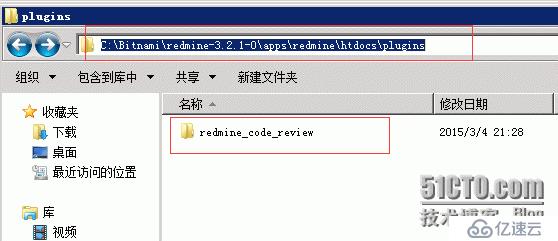
注意,code review插件解压缩后,必须把文件夹放入plugins文件夹,不能把目录中的文件放入
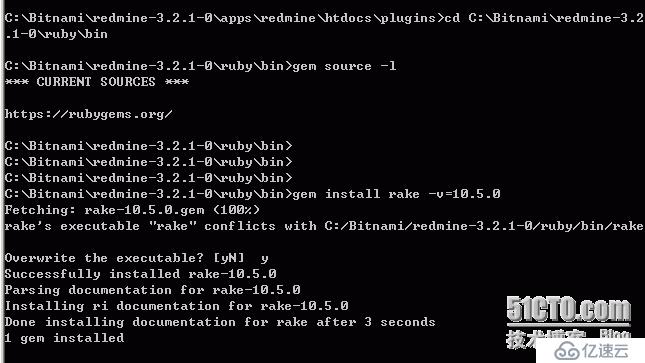
首先切换到ruby\bin目录,更新 rake到版本10.5.0,否则会报错:
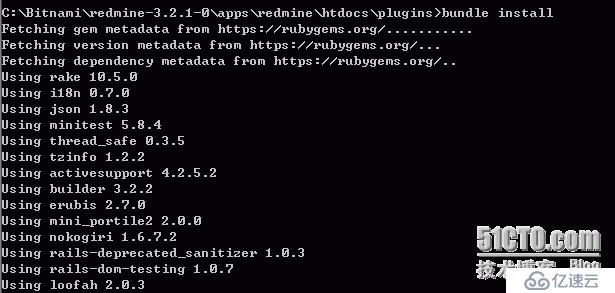
然后,切换到plugins ,输入bundle install
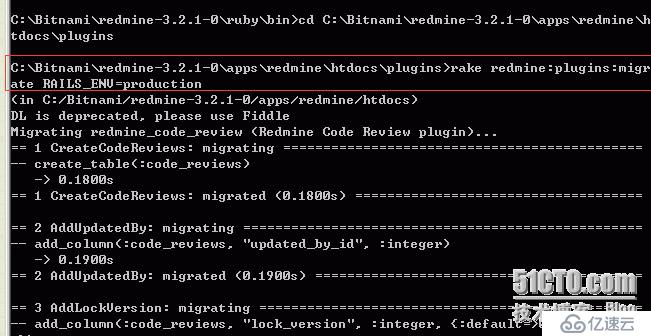
最后输入rake 命令安装插件:
接下来,重启
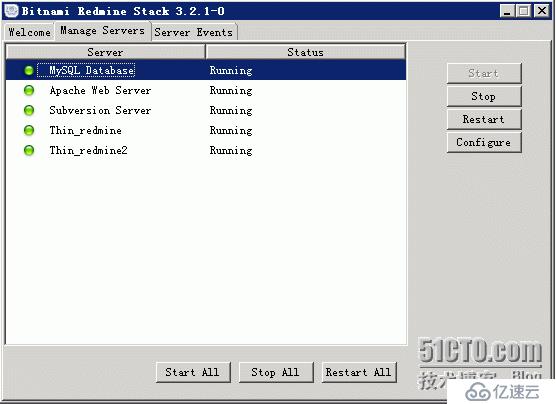
接下来,
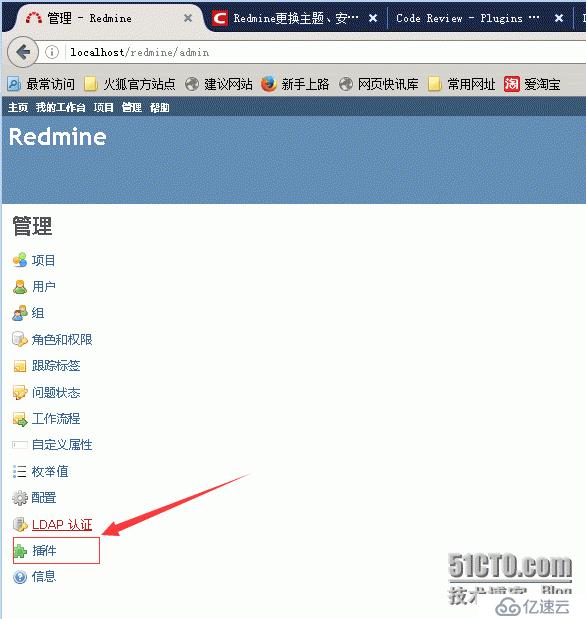
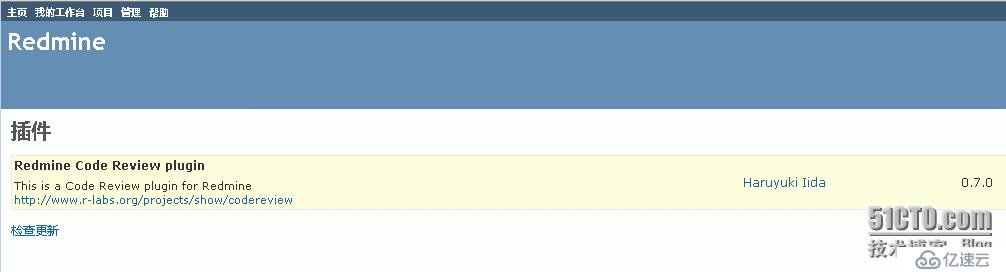
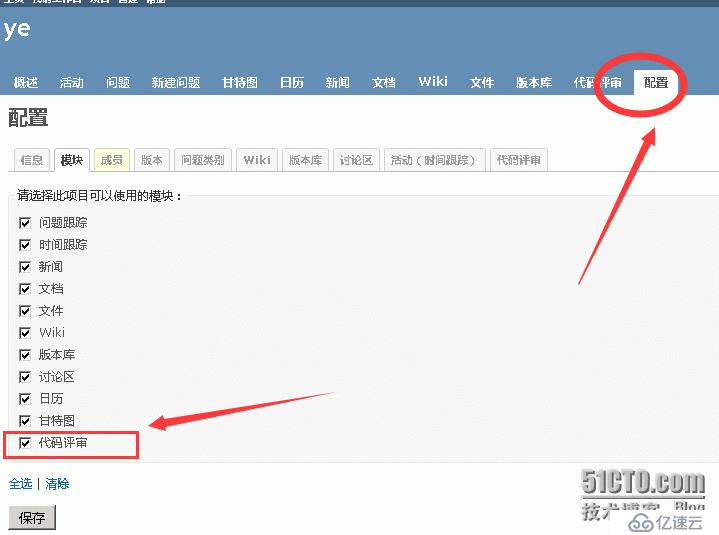
上一篇:redmine问题集锦02
相关内容
热门资讯
空调连续工作多久需要停机休息
空调连续工作的时间取决于多个因素,包括空调的型号、功率、使用环境和维护情况等。一般来说,空调可以连续...
空调哪个符号是除湿的
空调除湿功能通常用一个水滴形状的符号表示。不同品牌和型号的空调遥控器可能会有所差异,但一般来说,除湿...
格力空调多长时间加一次氟利昂
1、一般情况下,空调对氟利昂的使用量是非常小的,所以在空调使用了四年左右的时候再考虑加也没问题。2、...
空调用多长时间需要加氟一次
一般情况下是五年。当出现以下这几种情况时,空调才需要加氟。1、空调的室内机和室外机各有两个接口,当接...
格调生活·C标思享荟:卡萨帝在...
9月12日的郑州龙湖金融岛,夜风轻拂,灯光璀璨。“C标时刻共传奇——卡萨帝思享荟暨20周年品牌盛典郑...
品牌价值破千亿、高端份额持续领...
9月12日,“C标时刻共传奇——卡萨帝思享荟暨20周年品牌盛典郑州站”在郑州龙湖金融岛举办。2026...
空调主板坏了修800还是换新的
空调主板坏了是修还是换新,需要考虑多个因素,以下是一些建议:1. 维修成本:如果维修费用较低,比如 ...
空调开多久需要休息多长时间
问题:空调开多久需要休息多长时间回答:1、在使用空调的过程中,一般空调开7~8个小时左右需要休息2~...
中央空调多长时间清洗一次
1、一般空调开机前清洗一次即可,空调开机中间时段再清洗一次,空调关机时清洗一次,这样比较合理。2、空...
中央空调氟利昂多久加一次
看空调制热和制冷程度,很多人的观点认为氟利昂必须一年放一次,其实这个观点是错误的,理解上面有点偏差,...