

C# 添加Word水印(文本水印、图片水印)_基于Spire.Cloud.Word
概述
Spire.Cloud.Word提供了watermarksApi接口可用于添加水印,包括添加文本水印(SetTextWatermark)、图片水印(SetImageWatermark),本文将对此做详细介绍。
关于Spire.Cloud
Spire.Cloud是云端 Office 文档处理软件,支持在线创建、编辑、保存和打印 Office (Word / Excel / PPT) 文档,支持 .NET、Java、PHP、Python、JavaScript 等多种编程语言,可操作包括DOC、DOCX、XLS、XLSX、PPT、PPTX、PDF等格式的文档。
可调用Spire.Cloud Web API SDK 提供的接口对 Word、Excel、PPT、PDF 文档进行操作,本文以在VS程序中通过调用Spire.Cloud.Word.SDK来操作Word文档为例,添加水印。
具体步骤:
步骤1:dll文件获取及引用。通过Nuget网站下载获取Spire.Cloud.Word.SDK package,并将Spire.Cloud.Word.Sdk.dll及其依赖项的dll添加引用至程序(如下图);或者在VS程序中通过Nuget搜索安装,具体步骤可参考这里。
步骤2:ID及Key获取。在冰蓝云网页注册账号并登陆,在“我的应用”板块创建应用程序,获得 App ID 及 App Key。
步骤3:文件路径设置。在冰蓝云网页“我的文档”板块,分别建立input和output两个文件夹,并将测试的Word文档和图片添加在input文件夹下。通过VS代码程序,生成的带水印的Word文档会直接保存至output文件夹下。具体代码操作方法,请参考以下内容。
【示例1】添加文本水印
using Spire.Cloud.Word.Sdk;
using Spire.Cloud.Word.Sdk.Api;
using Spire.Cloud.Word.Sdk.Client;
using Spire.Cloud.Word.Sdk.Model;
using System;

namespace txtwatermark
{
    class Program
    {

        static String appId = "应用程序App ID";
        static String appKey = "应用程序App Key";
        static void Main(string[] args)
        {
            //配置账号信息
            Configuration wordConfiguration = new Configuration(appId, appKey);

            //创建TablesApi实例
            WatermarksApi watermarksApi = new WatermarksApi(wordConfiguration);

            //设置文件夹、测试文档、水印字样及水印样式等
            string inputfolder = "input";
            string storage = null;
            string password = null;
            var document = "testfile.docx";
            string name = document;
            TextWatermark body = new TextWatermark("Watermark")
            {
                Layout = TextWatermark.LayoutEnum.Diagonal,
                Font = new Font(60, "宋体")
                {
                    Color = new Color(100, 100, 100)
                }
            };

            //调用SetTextWatermark接口添加文本水印到Word文档 ,并保存到指定文件路径
            string destFilePath = "output/SetTextWatermark.docx";
            watermarksApi.SetTextWatermark(name, body, inputfolder, storage, password, destFilePath);

        }
    }
}
文本水印添加效果:
【示例2】添加图片水印
using Spire.Cloud.Word.Sdk;
using Spire.Cloud.Word.Sdk.Api;
using Spire.Cloud.Word.Sdk.Client;
using System;

namespace ImgWatermark
{
    class Program
    {
        static String appId = "应用程序App ID ";
        static String appKey = "应用程序App Key ";
        static void Main(string[] args)
        {
            //配置账号信息
            Configuration wordConfiguration = new Configuration(appId, appKey);

            //创建TablesApi实例
            WatermarksApi watermarksApi = new WatermarksApi(wordConfiguration);

            //设置文件夹、测试文档、用于水印的图片及水印样式等
            string inputfolder = "input";
            string storage = null;
            int scaling = 120;
            bool washout = true;
            string password = null;

            var document = "testfile.docx";
            string name = document;
            string imagePath = "input/logo.png";

            //调用SetImageWatermark接口添加图片水印到Word文档 ,并保存到指定文件路径
            string destFilePath = "output/SetImageWatermark.docx";
            watermarksApi.SetImageWatermark(name, imagePath, inputfolder, storage, scaling, washout, password, destFilePath);
        }
    }
}
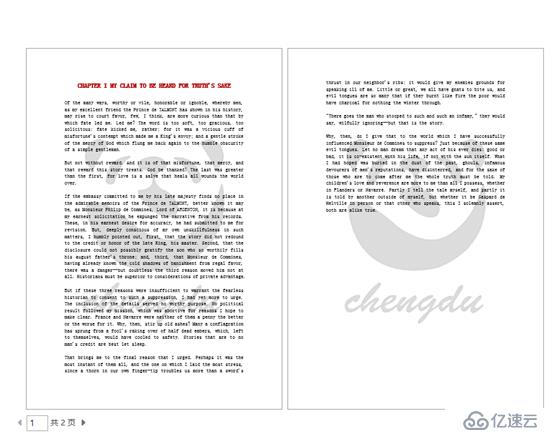
图片水印添加效果:
(本文完)
上一篇:MVC下拉框的传值的两种方式
下一篇:.NET连接池的问题详解