

Fragment Shaders(像素着色器)
周一到周五,每天一篇,北京时间早上7点准时更新~,中英文对照,一边学编程一边弹吉他,做一个奇葩码农!
The fragment shader is the last programmable stage in OpenGL’s graphics pipeline(像素着色是可编程管线的最后一个阶段). This stage is responsible for determining the color of each fragment before it is sent to the framebuffer for possible composition into the window(这个阶段将决定给像素涂上什么颜色). After the rasterizer processes a primitive(在光栅器处理了图元之后), it produces a list of fragments that need to be colored and passes this list to the fragment shader(它会产生一系列需要被涂颜色的像素列表,然后把它传递给像素着色器). Here, an explosion in the amount of work in the pipeline occurs, as each triangle could produce hundreds, thousands, or even millions of fragments(在这个阶段将会产生巨大的工作,因为每个三角形会覆盖几百几千个甚至上百万个像素点)
Listing 2.4 in Chapter 2 contains the source code of our first fragment shader(Listing2.4中展示了我们第一个像素着色器的代码). It’s an extremely simple shader that declares a single output and then assigns a fixed value to it(它简单的输出一个颜色). In a real-world application, the fragment shader would normally be substantially more complex and be responsible for performing calculations related to lighting, applying materials, and even determining the depth of the fragment(在现实情况中,像素着色器是非常复杂的,往往牵扯到光照、材质、甚至是需要计算像素的深度). Available as input to the fragment shader are several built-in variables such as gl_FragCoord, which contains the position of the fragment within the window(像素着色器有很多输入变量,其中就有一个内置变量叫gl_FragCoord,它存储的是像素在窗口中的坐标). It is possible to use these variables to produce a unique color for each fragment(你可以用这些输入的变量去为每个像素赋值他们各自独特的颜色)
Listing 3.10 provides a shader that derives its output color from gl_FragCoord.(Listing4.10展示了一个从gl_FragCoord中推导像素颜色的代码) Figure 3.4 shows the output of running our original single-triangle program with this shader installed(图3.4展示了我们使用这个shader时会得到的画面)
#version 450 core
out vec4 color;
void main(void)
{
color = vec4(sin(gl_FragCoord.x 0.25) 0.5 + 0.5,
cos(gl_FragCoord.y 0.25) 0.5 + 0.5,
sin(gl_FragCoord.x 0.15) cos(gl_FragCoord.y * 0.15),
1.0);
}
Listing 3.10: Deriving a fragment’s color from its position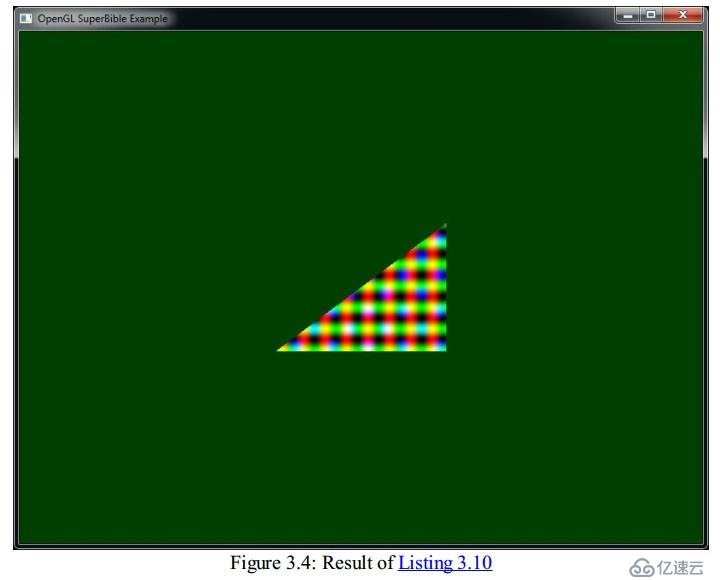
As you can see, the color of each pixel in Figure 3.4 is now a function of its position and a simple screen-aligned pattern has been produced. (现在你可以看到,每个像素的颜色与它的位置有关了)The shader of Listing 3.10 created the checkered patterns in the output(Listing3.10的代码产生了一个棋盘各自的输出画面)
The gl_FragCoord variable is one of the built-in variables available to the fragment shader(gl_FragCooord是可以被像素着色器使用的内置变量之一). However, just as with other shader stages, we can define our own inputs to the fragment shader, which will be filled in based on the outputs of whichever stage is last before rasterization(同样,就如同其他的可编程部分一样,我们可以设置我们自己的输入参数,这样一来我们还可以根据我们自己输入的参数来绘制颜色了). For example, if we have a simple program with only a vertex shader and fragment shader in it, we can pass data from the fragment shader to the vertex shader(例如,我们的程序如果只有vertex shader和fragment shader的话,我们可以从fragment shader传送数据给vertex shadear,我们认为刚才这句话是书本写错了,但是我们只是按照原书在翻译)
The inputs to the fragment shader are somewhat unlike inputs to other shader stages(输入fragment shader的数据不像是输入其他阶段的数据), in that OpenGL interpolates their values across the primitive that’s being rendered(在数据抵达像素渲染器之前,会被OpenGL插值). To demonstrate, we take the vertex shader of Listing 3.3 and modify it to assign a different, fixed color for each vertex, as shown in Listing 3.11(为了说明这个问题,我们在Listing3.3的基础上,修改一下它的代码,给每个点一个颜色,如同Listing3.11所示)
#version 450 core
// 'vs_color' is an output that will be sent to the next shader stage
out vec4 vs_color;
void main(void)
{
const vec4 vertices[3] = vec4[3](vec4(0.25, -0.25, 0.5, 1.0),
vec4(-0.25, -0.25, 0.5, 1.0),
vec4(0.25, 0.25, 0.5, 1.0));
const vec4 colors[] = vec4[3](vec4(1.0, 0.0, 0.0, 1.0),
vec4(0.0, 1.0, 0.0, 1.0),
vec4(0.0, 0.0, 1.0, 1.0));
// Add 'offset' to our hard-coded vertex position
gl_Position = vertices[gl_VertexID] + offset;
// Output a fixed value for vs_color
vs_color = color[gl_VertexID];
}
Listing 3.11: Vertex shader with an output
As you can see, in Listing 3.11 we added a second constant array that contains colors and index into it using gl_VertexID, writing its content to the vs_color output(就如上述代码,我们为每个点设置了一个颜色). In Listing 3.12 we modify our simple fragment shader to include the corresponding input and write its value to the output(在Listing3.12中,我们展示了配套的fragment shader的代码)
#version 450 core// 'vs_color' is the color produced by the vertex shader
in vec4 vs_color;
out vec4 color;
void main(void)
{
color = vs_color;
}
Listing 3.12: Deriving a fragment’s color from its position
The result of using this new pair of shaders is shown in Figure 3.5. As you can see, the color changes smoothly across the triangle(代码修改完毕之后,结果如同图3.5所示,你可以看到,三角形上的颜色是渐变的)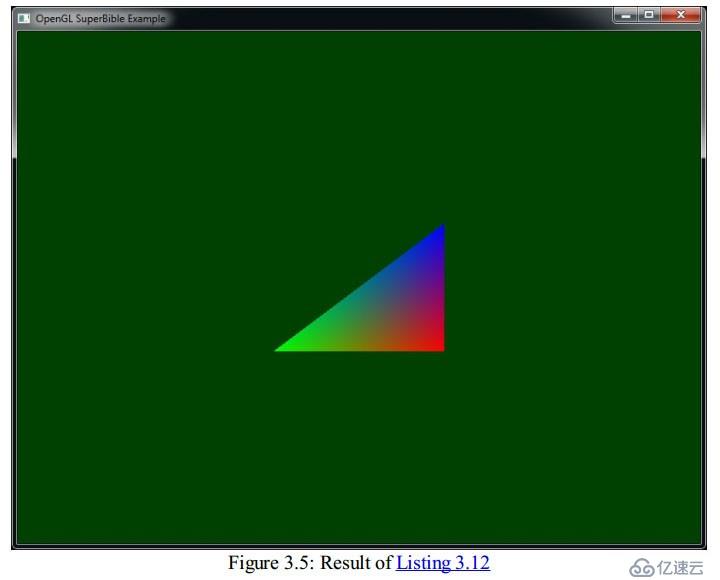
本日的翻译就到这里,明天见,拜拜~~
第一时间获取最新桥段,请关注东汉书院以及图形之心公众号
东汉书院,等你来玩哦