

在64位系统上使用PowerShell操作Foxpro
操作步骤:
1. 下载Foxpro的OLEDB驱动VFPOLEDBSetup.msi,安装,选择允许everyone运行。
2. 注册OLEDB驱动:
regsvr32 /s "C:\Program Files (x86)\Common Files\system\ole db\vfpoledb.dll"
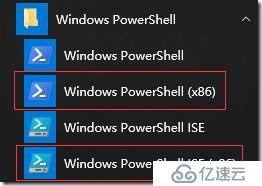
3. 运行x86版PowerShell:
$ConnString = "Provider=vfpoledb.1;Data Source=c:\accounts.dbf;Collating Sequence=machine;"
$Conn = new-object System.Data.OleDb.OleDbConnection($connString)
$conn.open()
$cmd = new-object System.Data.OleDb.OleDbCommand("select * from accounts", $Conn)
$DataAdapter = new-object System.Data.OleDb.OleDbDataAdapter($cmd)
$dataset = new-object System.Data.Dataset
$DataAdapter.fill($dataset)
$dataset.Tables[0]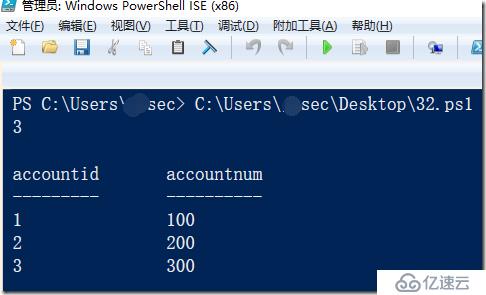
坑列表:
从Foxpro驱动描述:
“The VFPODBC driver is no longer supported. We strongly recommend using the Visual FoxPro OLE DB provider as a replacement.”
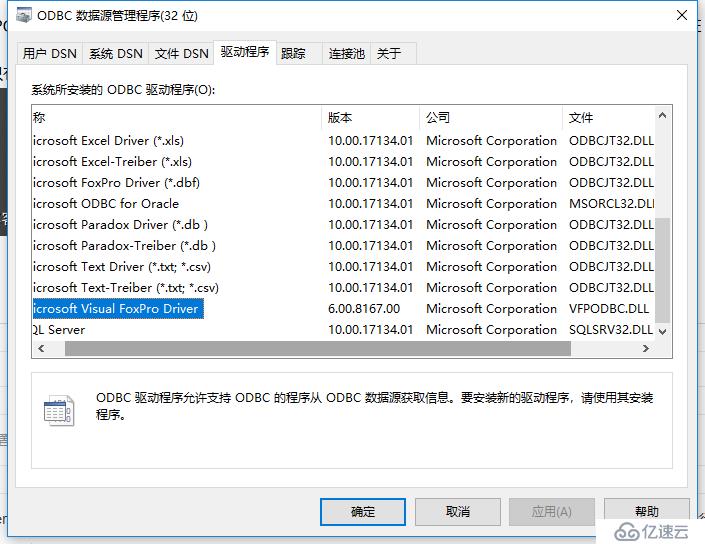
ODBC驱动分为32位和64位。只有编译为32位的应用程序才能调用32位的ODBC驱动。
"A 32-bit app uses a 32-bit ODBC driver even when installed on 64-bit Windows. But on 64-bit systems, there are two views on ODBC - one is 64-bit, the other is 32-bit. It looks like you opened the default 64-bit view which doesn't show the 32-bit ODBC drivers. To solve this go to c:\windows, there you see a folder named SysWOW64. Here you find odbcad32.exe. After launching the exe you can add a new system dsn or user dsn for the required ODBC driver. Configure it as usual. All other ODBC drivers you have been missing will appear there."

安装了Visual Foxpro后,会安装32位ODBC驱动VFPODBC.DLL。
安装OLEDB驱动时要选择允许everyone运行。
要注册vfpoledb.dll。
OLEDB驱动的Provider为vfpoledb.1。
要在32位PowerShell下运行来调用该驱动。
后记:
尝试在32位PowerShell下操作ODBC驱动,失败。
$ConnString ="Driver={Microsoft Visual FoxPro Driver};SourceType=DBF;SourceDB='c:\foxpro\';Exclusive=No;Collate=Machine;NULL=NO;DELETED=NO;BACKGROUNDFETCH=NO;"
$Connection = New-Object System.Data.Odbc.OdbcConnection
$Connection.ConnectionString = $ConnString
$Connection.Open()
$Command = New-Object System.Data.Odbc.OdbcCommand
$Command.Connection = $Connection
$Command.CommandText = $Query
$Reader = $Command.ExecuteReader()
$Counter = $Reader.FieldCount
while ($Reader.Read()) {
    $SQLObject = @{}
    for ($i = 0; $i -lt $Counter; $i++) {
        $SQLObject.Add(
            $Reader.GetName($i),
            $Reader.GetValue($i));
    }
    $SQLObject
}
$Connection.Close()
$Reader.Close()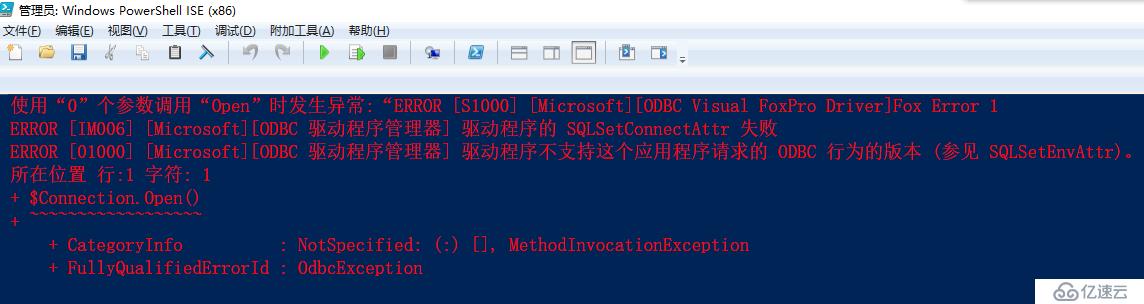
但在32位操作系统上运行是正常。若其他语言在开发时应编译为32位版本。